For drilling contractors and oilfield service companies
Keep every rig certified, maintained and audit-ready.
RigLife tracks every piece of equipment from the mast to the last shackle: certificates against API, LOLER and ISO standards, maintenance by calendar or running hours, and field work done from the phone, even offline.
- Arabic and English
- Oilfield or metric units
- Works offline on the rig
Built around the standards your auditors already check
- API RP 4G
- API RP 8B
- API RP 7L
- API Std 53
- LOLER
- ISO 14224
- IEC 60079-17
- NFPA 10
The problem
Rigs still run on spreadsheets, paper and WhatsApp
Every contractor knows what that costs. It shows up as a stopped job, a failed audit or a call in the middle of the night.
-
An expired sling certificate, found by the client’s auditor, stops the job.
-
A missed 250-hour service turns into a generator trip in the middle of the night.
-
Nobody is sure which breaker feeds the mud pump when it has to be isolated.
-
Nobody knows what last month’s downtime actually cost.
What RigLife does
One record for every piece of equipment
From the mast and the BOP stack to slings, shackles and gas detectors: who inspected it, what is due, what failed and what it cost.
-
Certificates and inspections
Every certificate with its standard, issuer and expiry date. Alerts 30 days ahead, and the full history ready for the auditor.
-
Preventive maintenance
Plans by calendar or running hours. Hours are logged in the field, and the next due date moves forward on its own.
-
Field work, offline
Technicians scan the QR tag, follow the checklist with photos and readings, and sync when the signal comes back.
-
Electrical map and isolation
Every motor is linked to its drive or breaker through a tagged cable, so the isolation points are on screen before anyone opens a cover.
-
Failures and downtime
Failures coded to ISO 14224 and downtime costed at the rig’s day rate, so the worst offenders stand out.
-
Client portal and audit trail
Give the operator’s company man read-only access, and keep a record of who changed what, and when.
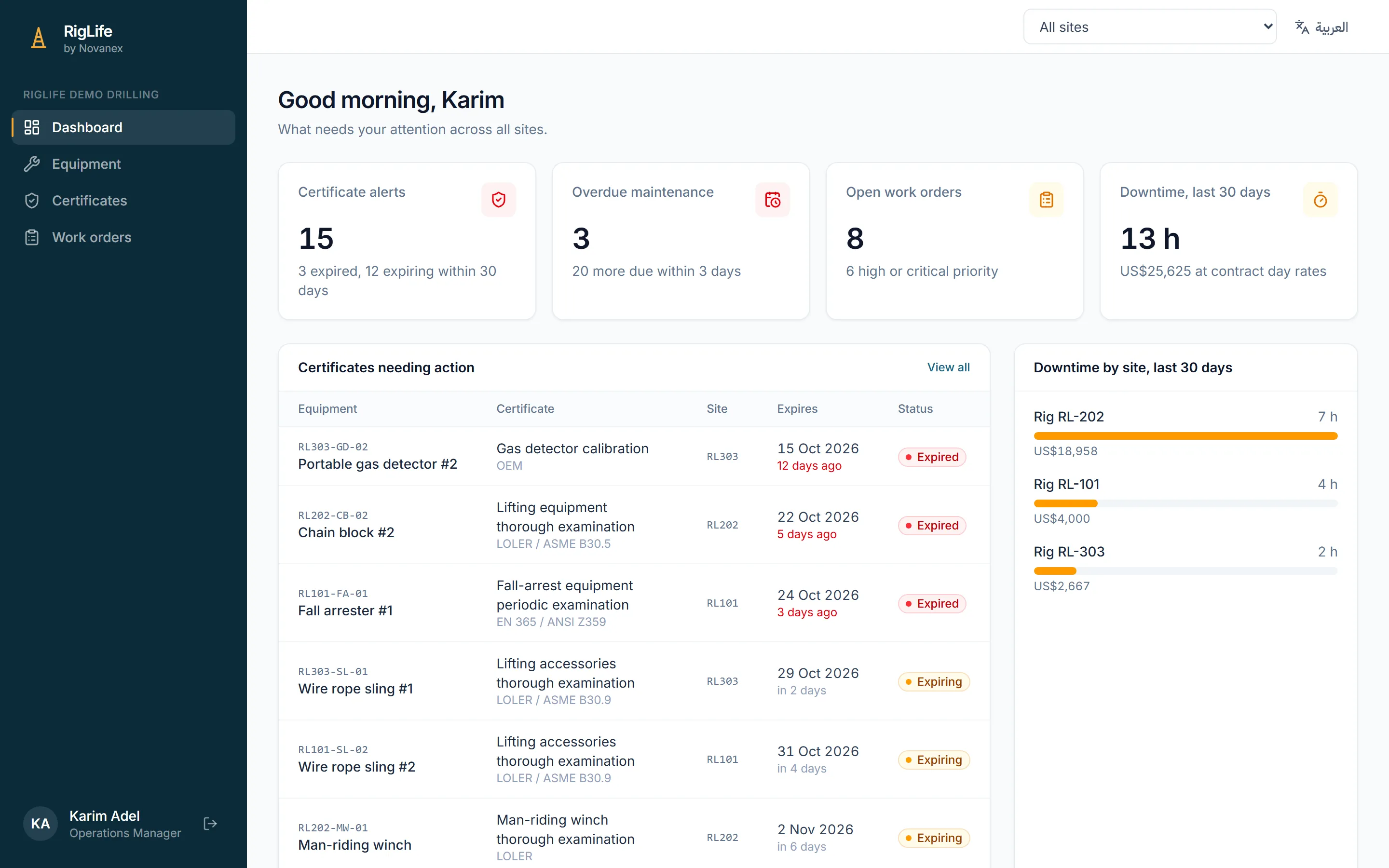
Dashboard
See what needs action across every rig
One screen for the operations manager: what is expiring, what is overdue, what is open and what downtime is costing, rig by rig.
- Certificate alerts 30 days ahead
- Maintenance due by date or by running hours
- Open work orders by priority
- Downtime cost at contract day rates
Electrical safety
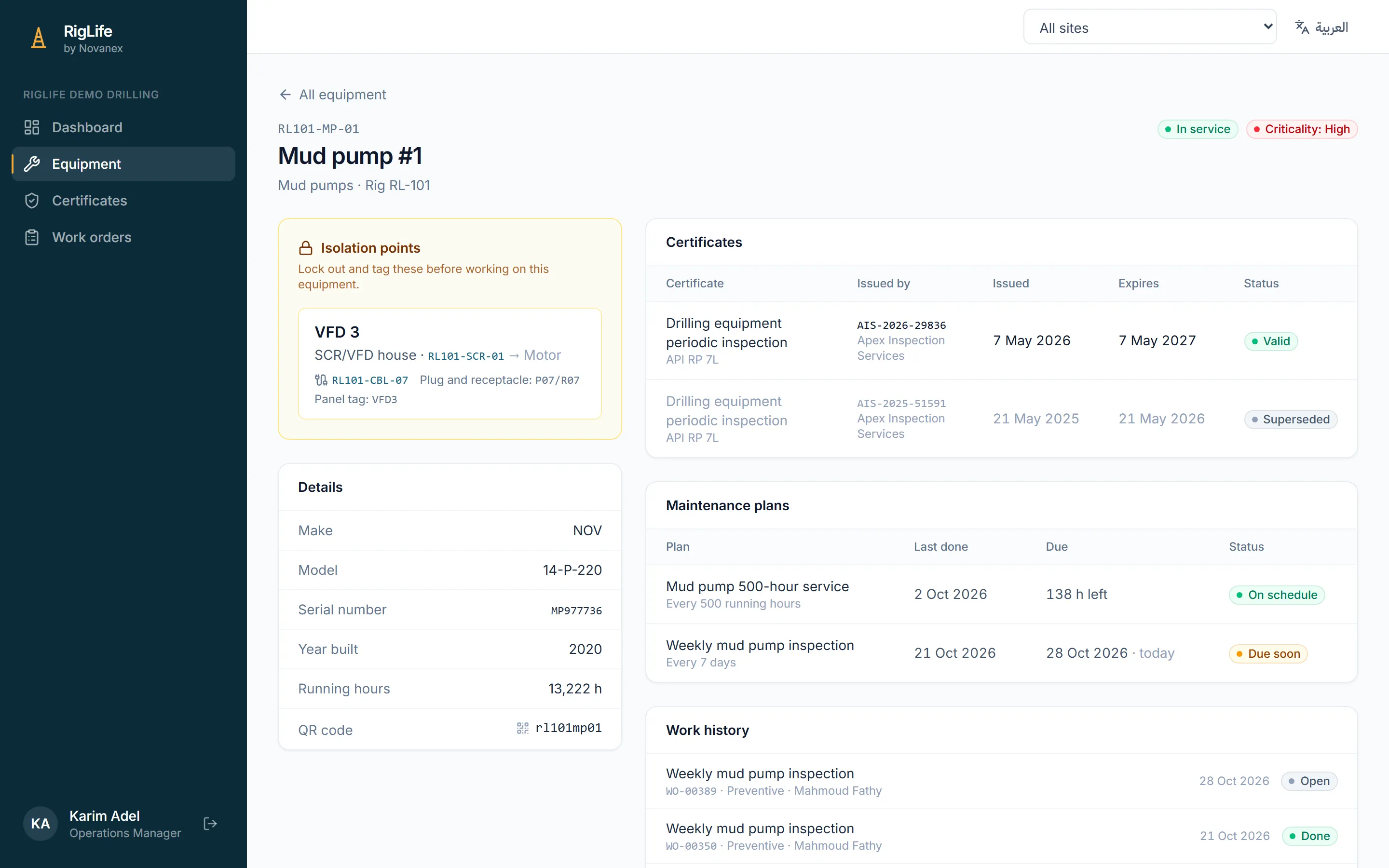
The breaker to lock out, before the cover comes off
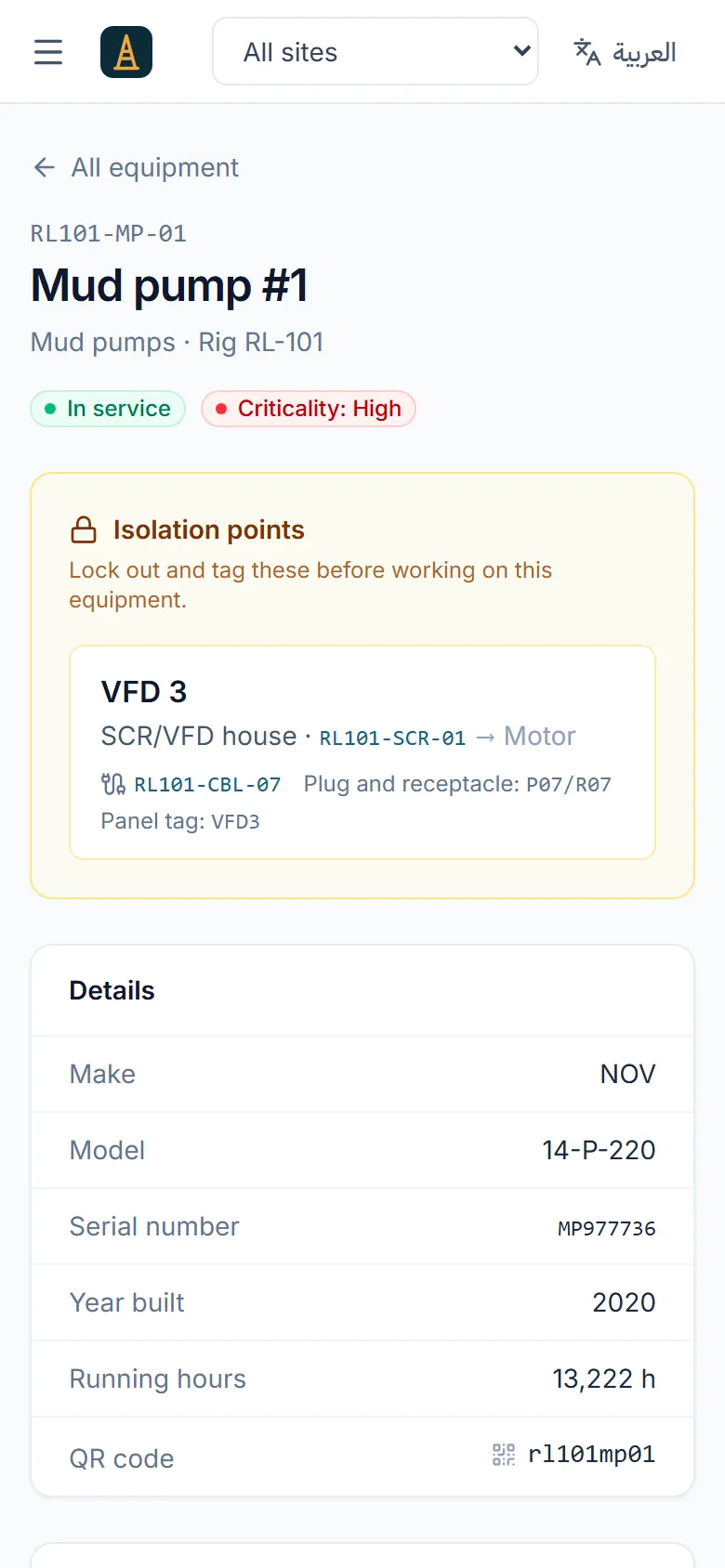
Each motor is traced to its drive or MCC bucket through a tagged cable, and every equipment page starts with its isolation points.
- Drive, cable, plug and panel tag for every motor
- Cable specs and insulation-test certificates
- A reconnection checklist after every rig move
- Coming next: running hours and trips read straight from the drives
On the rig floor
Built for the people doing the work
The QR tag on the equipment opens its file: open work orders, checklists, last readings and certificates, in Arabic or English.
- Works without signal and syncs when it returns
- Photos and readings on every checklist item
- Each technician sees their own rig and tasks
How it works
Three steps from spreadsheets to a live rig
- 1
Load your equipment
Send your equipment lists and certificates as they are, in Excel or PDF. We load them, print the QR tags and map every motor to its panel and cable.
- 2
Set the rules
Start from templates for API, LOLER and manufacturer intervals, then match them to each client’s requirements.
- 3
Work from the field
Technicians close work orders from the phone. Managers and clients follow every rig from the dashboard.
Who it is for
Made for the companies that keep rigs running
-
Drilling contractors
Land rigs and jack-ups, with every rig move, inspection and repair on record.
-
Oilfield service companies
Pumps, units and tools spread across many wells and many clients.
-
Rental fleets and workshops
Know what is certified and ready to ship before it leaves the yard.
-
Operators
A read-only view of your contractors’ certificates and maintenance.
Ready for Egypt, the Gulf and beyond
- Arabic and English, with a proper right-to-left layout
- Oilfield or metric units, per company and per user
- Each rig on its own time zone and report day
- Hosted in your region, or inside your country when the data must stay there
Your data stays yours
- Each company’s data isolated at the database level
- Access by role, from technician to the client’s viewer
- A full audit trail of every change
FAQ
Questions we hear often
Do technicians need internet on the rig?
No. The mobile app works offline and syncs when a connection comes back.
Can we bring our current equipment lists?
Yes. Send your spreadsheets and certificates as they are, and we load the equipment, certificates and maintenance plans for you.
Which standards does RigLife cover?
The templates cite API RP 4G, 8B and 7L, API Std 53, LOLER, IEC 60079-17, NFPA 10 and others. Every interval can be adjusted to your client’s requirements.
Where is our data hosted?
In a secure cloud region close to your operations, or inside your country when regulations require it.
How is RigLife priced?
Per rig per month, plus a one-off setup that covers loading your data and tagging the equipment. Book a demo and we will send you a quote.
Book a demo
See RigLife with your own equipment
Book a 20-minute demo. Send one rig’s equipment list and we will show it to you inside RigLife.
- A walkthrough of the dashboard and the field app
- Your own equipment loaded for the demo
- A quote for your fleet